
How it looks in the platform
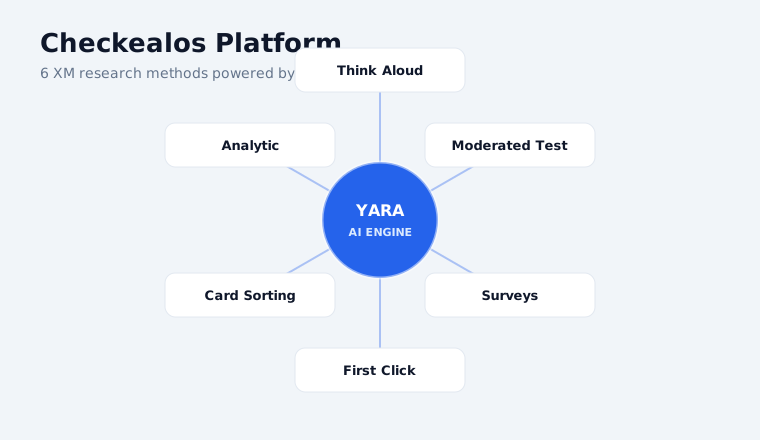
The platform
Studies, panel and analysis in one place.
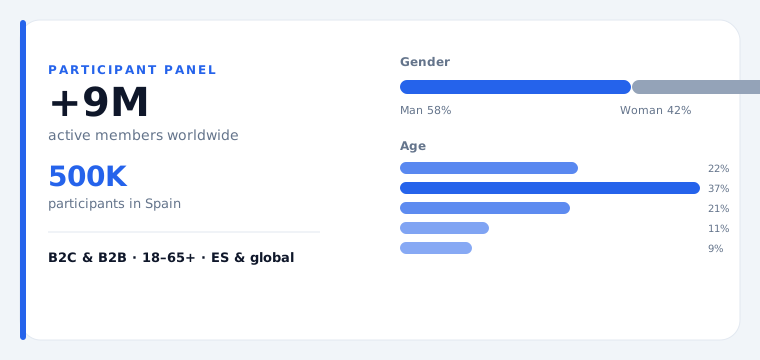
The panel
Qualified testers by country, language and profile.
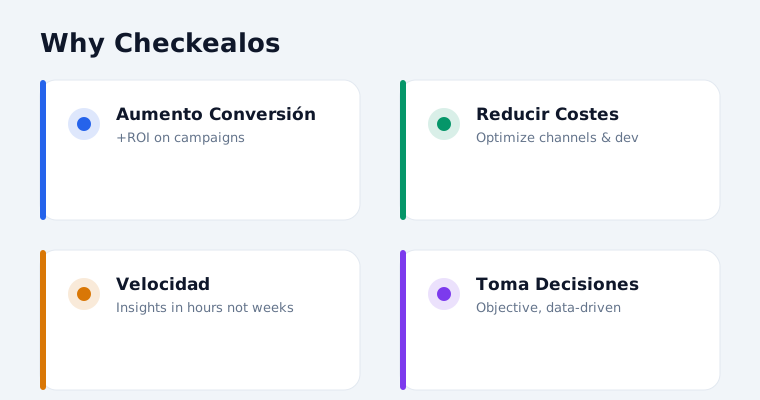
The results
Metrics comparable with your previous studies.
What you will get
METHODOLOGY: Unmoderated Usability Testing DIMENSION: HX (Human Experience) USE CASE: Website and app feedback DEPARTMENT: Human Resources (HR) ANALYSIS: Statistical analysis + thematic coding OUTPUT: Actionable insights report with prioritized recommendations TEMPLATE: Usability Test: Get product onboarding feedback — Digital Feedback
What is this template?
Usability Test: Get product onboarding feedback — Digital Feedback is a comprehensive toolkit for Human Resources teams addressing website and app feedback. Built on Unmoderated Usability Testing principles, it helps organizations close the gap between current and desired human experience.
Purpose: Support Human Resources in moving from opinion-based to evidence-based decisions on website and app feedback using Unmoderated Usability Testing.
Why it matters in Employee Experience
In Employee Experience listening is only the first step; what matters is that people see change. This study is designed to produce actionable signal without burning out your workforce with surveys.
Problem it solves
Disconnected data sources around website and app feedback prevent Human Resources from seeing the full picture and making informed decisions.
Proposed solution
Deploy Usability Test: Get product onboarding feedback — Digital Feedback to establish a continuous Unmoderated Usability Testing loop for website and app feedback. Human Resources gains real-time visibility and a clear action framework.
Study tasks
-
01
Step 1
Define 5–7 realistic task scenarios for "Usability Test: Get product onboarding feedback — Digital Feedback" that mirror actual user behavior in website and app feedback.
-
02
Step 2
Recruit 5–8 participants per segment from Human Resources. Screen for device type (mobile/desktop) and familiarity with website and app feedback.
-
03
Step 3
Configure unmoderated platform: task completion criteria, think-aloud prompts, auto-stopwatch per task.
-
04
Step 4
Launch study with staggered starts. Monitor first 3 submissions; adjust instructions if needed for website and app feedback.
-
05
Step 5
Collect per-task metrics: success rate, time-on-task, error count, SEQ difficulty rating (1–7).
-
06
Step 6
Review screen recordings: exact click paths, rage clicks, hesitation moments, navigation dead-ends.
-
07
Step 7
Compile heatmaps and click-path analysis. Compare across segments for systemic vs. specific issues in website and app feedback.
-
08
Step 8
Deliver scorecard: task-level results, prioritized issues (Critical/Major/Minor), Before/After wireframes.
How to prepare it
Briefing, sample and screening criteria
Briefing
Define the goal in one sentence before touching the template: which decision depends on this study. In Usability Test: Get product onboarding feedback — Digital Feedback the goal is Support Human Resources in moving from opinion-based to evidence-based decisions on website and app feedback using Unmoderated Usability Testing. That sentence is the filter for everything else.
Muestra
For Unmoderated Usability Testing we recommend 40-60 participants and a duration of 15-25 minutes. In the Checkealos panel we recruit by country, language, device and professional profile, so your sample arrives pre-qualified.
Criterios
Write your screening criteria in positive form (who DOES fit) and negative form (who would contaminate the sample). Add one control question: if the participant fails it, the response stays out of the analysis.
How to analyse it
Metrics and how to read them
Metricas
This study returns: Task success rate, time on task, SUS, SEQ, drop-off. Every metric is computed the same way across all Unmoderated Usability Testing studies, so you can compare against your own history and against sector benchmarks.
Interpretar
Never read one metric in isolation: cross success with time and with perceived effort. High success with high effort means a flow that works only through sheer user stubbornness; low success with short times usually means an expectation problem, not a design problem.
Best practice and common mistakes
Best practice
- Run a pilot with 3-5 participants before opening the full sample.
- Write tasks as goals, not instructions (“get the receipt”, not “click the blue button”).
- Record a baseline metric before the change so you can measure the improvement.
- Keep the verbatim quotes: those are the ones that convince a board.
- Close the loop: share what changed after the study.
Common mistakes
- Asking for opinion instead of measuring behaviour.
- Recruiting colleagues as if they were real users.
- Changing several things at once and not knowing what worked.
- Leaving the sample open “until we have enough” and mixing waves.
- Shipping the report without a decision assigned to each finding.
Sample tasks and questions
Ready-to-copy examples for your study
Example 1
Define 5–7 realistic task scenarios for "Usability Test: Get product onboarding feedback — Digital Feedback" that mirror actual user behavior in website and app feedback.
Example 2
Recruit 5–8 participants per segment from Human Resources. Screen for device type (mobile/desktop) and familiarity with website and app feedback.
Example 3
Configure unmoderated platform: task completion criteria, think-aloud prompts, auto-stopwatch per task.
Example 4
Launch study with staggered starts. Monitor first 3 submissions; adjust instructions if needed for website and app feedback.
Use cases by department
Who uses this template inside the company
Human Resources (HR)
Website and app feedback
HR
Website and app feedback
People
Website and app feedback
Board
Website and app feedback
Operations
Website and app feedback
Cause & effect analysis
Cause: No structured Unmoderated Usability Testing process for website and app feedback. Effect: Insights are anecdotal, priorities shift arbitrarily, and Human Experience initiatives fail to deliver ROI.
Template data
Dimension
Employee Experience (EX)
Methodology
Unmoderated Usability Testing
Use case
Website and app feedback
Department
Human Resources (HR)
Category
EXM01: Employee Engagement & Culture Pulse
What this template includes
Excel template
The study pre-built: tasks, screening criteria and metrics, ready to edit.
Session script
Instructions and script for the participant, aligned with the methodology.
Analysis template
Results dump with metrics computed and comparable.
Recruitment
Access to the tester panel by country, language and profile.
Related templates
Frequently asked questions
How many participants do I need?
For Unmoderated Usability Testing we recommend 40-60 participants. That is the point where the signal stabilises without inflating cost.
How long does the study take?
The session lasts 15-25 minutes per participant. Recruitment and field closure usually complete within 48-72 hours.
Can I use my own panel?
Yes. You can invite your own base or use the managed Checkealos panel; the template and the metrics are identical either way.
Which metrics will I get?
Task success rate, time on task, SUS, SEQ, drop-off. They are computed automatically and stay comparable with your previous studies.
Do I need a prototype or is the live product fine?
Both work. For Unmoderated Usability Testing what matters is that the participant can complete the task unassisted, in prototype or in production.
How does this fit the six dimensions?
This study sits in Employee Experience. Results feed the same data model as the other dimensions, so they can be crossed with what happens elsewhere.
Customise and launch this template
Edit the fields for your case and send it: we start recruitment.
Shall we run this study with your panel?
Download the template, adjust it and we will launch it with qualified testers.
Request a Demo